blog entry
The last infrastructure update for a while
Permalink for The last infrastructure update for a whileA few small notes on infrastructure improvement for TK-web
Okay I know I know. I write too much about building the website. This is the last big infrastructure update for the site for some time. I'll continue to make small updates here and there, but this is the last big one worth writing about and it's because it's a change truly worth celebrating.
I finally kicked Cloudflare off of the stack for TK's Web Quest and all my other self-hosted stuff! Permalink to this heading
Cloudflare has been a thorn in my side for quite some time. It's the one major thing that I felt guilty about using for my site. A huge amount of the web's traffic goes through Cloudflare, so much so that they feel kind of like a monopoly that sprang up overnight. Some of their free services are genuinely useful too! Tunnels are basically magic for folks behind restrictive networks if they want to host their own services and using tunnels on Cloudflare basically locks you into their DNS and caching.
But over time, it became very apparent that Cloudflare's teams were very interested in AI, to the point of reinventing Wordpress by smushing AI into Astro and calling it secure. In the end, I know that I will never be able to completely excise AI from my self hosted services. Too many people use it to wildly varying degrees for it to be completely removed. Their attitude rubs me the wrong way and they're a monopoly though, so this is where I'm putting my energy.
The previous layout Permalink to this heading
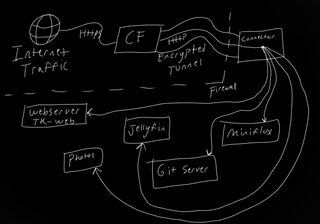
This is how tunnels work. I've labeled the server as CF here, but it's worth noting that my new Pangolin setup works exactly the same. At least for TK-web. Encrypted HTTPS web traffic goes from the user's computer to the tunnel concentrator at Cloudflare. Cloudflare terminates the transport encryption there, so they can read the contents of everything coming and going over the connection. They then wrap that traffic in an encrypted tunnel to send it to my server. Once it lands in my server, the tunnel connector program unwraps the data and forwards it to the correct application based on the URL the user requested. When the service responds, the traffic goes back exactly the way it came in, through the tunnel, then unwrapped at Cloudflare, who reinstates the HTTPS connection and sends it back to the user.
The new way Permalink to this heading
With Pangolin, I own the tunnel server, which means I am the trusted endpoint, even if your computer is connecting to my VPS's IP rather than my home network where the data actually is. Owning that tunnel means I'm no longer allowing my or my users' data to be given to Cloudflare. I also am not using their tunnels for streaming media, which is against their TOS. I'm also not subject to their 100MB file transfer limit, which means if I have a big Forgejo commit, or want to upload a big audiobook directly to my Grimmory server, then I can.
Pangolin does also give me one extra huge benefit and that is making resources available to myself without making them public on the internet. These private resources require a VPN tunnel to be established between my device and the Pangolin server, which forwards the VPN traffic to my home network. The setup is Zero Trust, which means even if someone somehow got my Pangolin server address and a login for it, they would also need access to my specific admin account to give their device access to the private VPN tunnel. This means I can make configuration changes to my home server securely from outside my network without having to fuss with a separate VPN service.
In conclusion, I'm really happy with the setup and am glad to no longer be contributing to Cloudflare's web security monopoly. Now I can finally get back to focusing on writing!